Summary
This 2025 guide looks at the best collaboration tools for remote teams. It helps businesses pick the right software for project management, communication, and document sharing. It offers comparisons, pricing, and setup tips. These help boost productivity, cut down context-switching, and enhance teamwork among global teams.
It’s not just about building a remote team; it is also about picking up the best collaboration tools for remote teams.
We built this guide to help you pick a remote collaboration stack that improves delivery speed, cuts context-switching, and protects your data.
Use the shortlists, comparison tables, and decision frameworks below to select with confidence.
Best Collaboration Tools for Remote Teams – Quick Picks (by primary job-to-be-done)
-
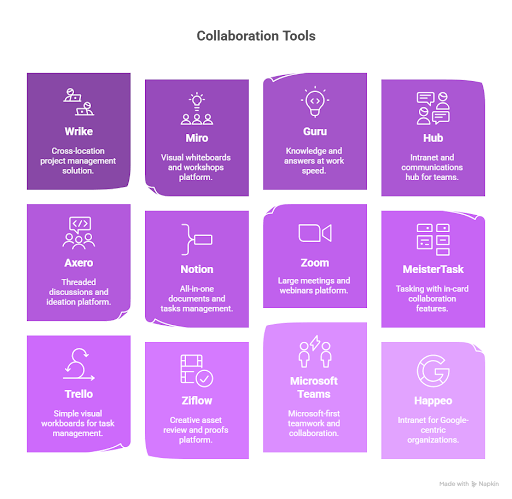
- Cross-location project management: Wrike
- Visual whiteboards & workshops: Miro
- Knowledge & answers at work speed: Guru
- Intranet + comms hub: Hub
- Threaded discussions & ideation: Axero
- All-in-one docs + tasks: Notion
- Large meetings & webinars: Zoom
- Tasking with in-card collaboration: MeisterTask
- Simple visual workboards: Trello
- Creative asset review & proofs: Ziflow
- Microsoft-first teamwork: Microsoft Teams
- Intranet for Google-centric orgs: Happeo
- Flat-priced PM + collaboration: ProofHub
- Email, docs, meetings bundle: Google Workspace
- Inclusive hybrid-remote calls: Around
Editor’s Scorecard (weighting)
-
- Core collaboration (25%) – messaging, meetings, file-share, tasking, calendar
- Standout features (25%) – integrations, security, workflows, AI, mobile
- Usability (10%) – clarity, shortcuts, dashboards
- Onboarding (10%) – tours, templates, training
- Support (10%) – channels, SLAs, help center
- Value (10%) – pricing clarity, free tiers, admin controls
- Customer voice (10%) – satisfaction, stability, adoption
Top 15 Collaboration Tools for Remote Teams
Here is a list of the best collaboration tools for remote teams with their USP, pricing, and plans/ trials, if any, on offer.
| Tool | Best For | Free Plan/Trial | Entry Price* |
| Wrike | Cross-location project management | Free plan | $10/user/mo (annual) |
| Miro | Collaborative whiteboards | Free plan | $8/user/mo (annual) |
| Guru | Knowledge doc collaboration | 30-day trial | $18/user/mo |
| Hub | Integrated comms + knowledge base | Demo | Custom |
| Axero | Interactive discussions/forums | 14-day trial | $10/user/mo |
| Notion | All-in-one workspace | Free + 14-day trial | $10/user/mo (annual) |
| Zoom | Video conferencing & webinars | Free plan + demo | $13.33/user/mo (annual) |
| MeisterTask | In-task collaboration | Free plan | $8.25/user/mo (annual) |
| Trello | Visual task management | Free plan | $5/user/mo (annual) |
| Ziflow | Creative asset collaboration | Free tier + 14-day trial | $10/user/mo (annual) |
| Microsoft Teams | Team comms & collaboration | 30-day trial + free | From $4/user/mo |
| Happeo | Intranet & internal comms | Free trial | Custom |
| ProofHub | Centralized project collaboration | 14-day trial | $45/mo (annual, flat) |
| Google Workspace | Integrated productivity suite | 14-day trial | $6/user/mo |
| Around | Inclusive hybrid-remote meetings | – | $7/user/mo (annual) |
*Public list pricing where available. Check vendors for region, billing cycle, and feature limits.
A Detailed Overview of the Best Collaboration Tools for Remote Teams
1) Wrike – Cross-location Project Management
We use Wrike when distributed squads need multiple views (Gantt, Kanban, table), real-time workload visibility, and governed workflows with approvals. In-app chat reduces tool-hopping. Good for PMOs and multi-team delivery. This makes Wrike one of the best collaboration tools for remote teams.
Strengths: portfolio views, robust automations, admin governance
Watch-outs: advanced features need setup; spaces/workflow limits on lower tiers
2) Miro – Collaborative Whiteboards
For workshops, PI planning, and async discovery, Miro’s infinite canvas, templates, and recorded walkthroughs help maintain momentum without requiring additional meetings.
Strengths: templates, facilitation add-ons, async Talktrack
Watch-outs: huge boards can lag; some integrations need admin prep
3) Guru – Knowledge Doc Collaboration
Teams get instant answers from verified cards, keep docs fresh with verification, and co-edit in real time to reduce repeat questions.
Strengths: AI-powered answers, verification, browser extensions
Watch-outs: chat/video isn’t core; pair with a comms app
4) Hub – Integrated Comms + Knowledge
A clean intranet + alerts + newsletters stack with smart targeting so updates reach the right roles without noise.
Strengths: targeted comms, approval workflows, federated search
Watch-outs: mobile parity and integration breadth vary by plan
5) Axero – Interactive Discussion Tools
Create durable threaded forums where ideas don’t disappear. Great for communities of practice and policy discussions.
Strengths: spaces, idea management, social feed
Watch-outs: mobile experience lags; search tuning may be needed
6) Notion – All-in-one Workspace
Blend documents, databases, tasks, and wikis. Highly configurable for product, ops, and design teams.
Strengths: flexible schema, strong community, multilingual
Watch-outs: offline is limited; learning curve for at-scale governance
7) Zoom – Video Conferencing & Webinars
Stable large meetings, breakouts, and strong recording make Zoom a safe pick for training and company-wide sessions.
Strengths: video quality, webinar suite, wide integrations
Watch-outs: free plan limits; lock security controls
8) MeisterTask – In-task Collaboration
Lightweight visual boards with owners/watchers, comments in-card, and color tags for quick triage.
Strengths: clarity, roles/permissions, affordable
Watch-outs: advanced features require ramp-up; verify mobile sync
9) Trello – Visual Task Management
Cards, lists, and boards remain the fastest way to make work visible. Add Butler automation and Power-Ups as you scale.
Strengths: simplicity, extensibility, low lift
Watch-outs: reporting is basic; boards can sprawl
10) Ziflow – Creative Asset Collaboration
Pro-grade online proofing for video, images, and PDFs with version compare and audit trails.
Strengths: precise annotations, workflows, compliance trails
Watch-outs: some integrations are upper-tier; tune notifications
11) Microsoft Teams – Microsoft-first Teamwork
Chat, meetings, files, and apps inside the M365 suite with enterprise security and meeting intelligence.
Strengths: native 365 integration, security posture, meeting extras
Watch-outs: setup can be complex; best with 365 licensing
12) Happeo – Intranet & Internal Comms
A single home for updates, pages, and AI search, especially effective for Google-centric organizations.
Strengths: targeted channels, enterprise search, knowledge automation
Watch-outs: customization depth may require training
13) ProofHub – Centralized Collaboration with Flat Pricing
Boards, Gantt, chat, approvals, and time-all without per-seat math.
Strengths: predictable cost, broad features
Watch-outs: performance variance; check mobile needs
14) Google Workspace – Integrated Productivity
Gmail, Drive, Docs, Sheets, Slides, Meet with real-time co-editing and shared calendars.
Strengths: real-time docs, simple sharing, strong admin
Watch-outs: internet-reliant; manage external sharing carefully
15) Around – Inclusive Hybrid-remote Meetings
Focuses on clear audio, echo prevention, and lightweight calls that don’t dominate your screen.
Strengths: sound tech, small-group focus, “equal mic” feel
Watch-outs: stays in its lane-pair with scheduling/tasks
Build Your Collaboration Stack Without Overlap
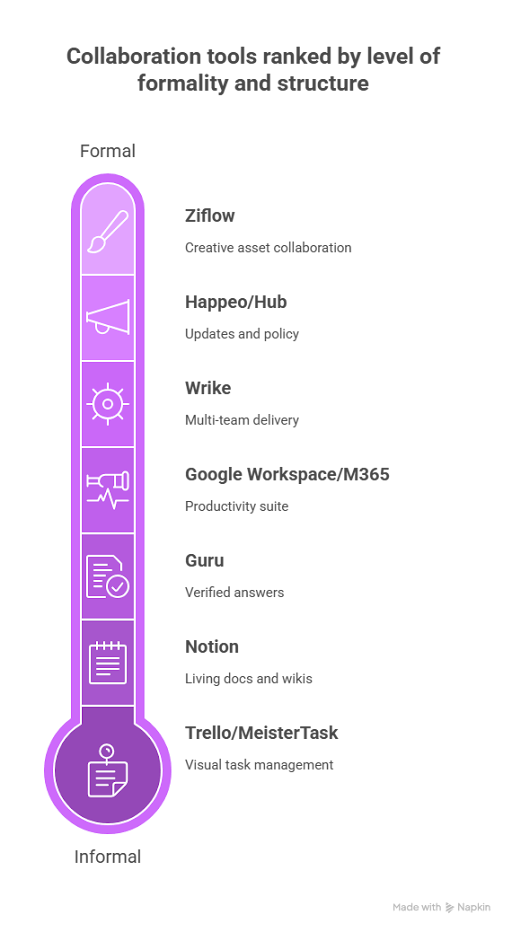
Although this is a list of the best collaboration tools for remote teams, you don’t need to have all of these tools operational and handy. Use this lean, complementary setup to cover the core jobs with minimal redundancy:
-
- Comms: Microsoft Teams or Slack (if you already use 365, Teams pairs best)
- Meetings: Zoom or Google Meet (pick one primary)
- Workboards/PM: Wrike (multi-team delivery) or Trello/MeisterTask (lightweight)
- Whiteboards: Miro for workshops and async walkthroughs
- Knowledge: Guru for verified answers or Notion for living docs/wikis
- Intranet: Happeo/Hub for top-down updates and policy
- Creative review: Ziflow, if you ship design/video weekly
- Productivity suite: Google Workspace or M365-don’t run both
Must-Have Feature Checklist
Security & Compliance
Security and adherence to compliance are of paramount importance if planning on building the best collaboration tools for remote teams.
-
- SSO/SAML · SCIM provisioning · MFA
- Role-based permissions · Granular sharing · Audit logs
- Data residency options · Encryption at rest/in transit
- DLP & retention policies · Legal hold
Admin & Governance
Remote team collaboration tools are built with the admin and governance aspect in mind, as they are the drivers of collaboration and smooth remote operations.
-
- Centralized org controls · Template locking
- Workspace/space policies · Domain allow/deny
- Provisioning via API/SCIM · Usage analytics
Collaboration Depth
How effectively the collaboration of remote teams can take place depends upon the depth and concurrent use of collaborative tools for remote working
-
- Real-time co-editing · Inline comments/mentions
- Task links to docs/boards · Whiteboard hand-off to backlog
- Recording/transcripts for meetings
Integration Surface
The ability to present a unified face and the efficiency with which it can merge to create a single application help software stand out as the best collaboration tools for remote teams.
Mobile & Offline
-
- iOS/Android parity · Offline for notes/docs
- Push notifications with quiet hours
Implementation Blueprint
Days 1–30 (Pilot & Proof)
-
- Pick one team, one project.
- Define 3 success metrics: async response time, meeting hours saved, task cycle time.
- Enable SSO/MFA. Lock external share rules.
- Import one live workflow (backlog → done).
- Run enablement: 45-min role-based training + 10 templates.
Days 31–60 (Scale & Integrate)
-
- Connect calendar, files, and issue tracker.
- Turn on automations for status updates and approvals.
- Migrate top 20% most-used docs/boards.
- Publish governance guardrails (naming, templates, owners).
Days 61–90 (Adopt & Optimize)
-
- Roll out to 2–3 more teams.
- Create an internal champions circle.
- Review analytics; prune inactive spaces.
- Finalize the deprecation timeline for legacy tools.
Cost Model Template
-
- Licenses: seats × entry price × 12
- Add-ons: webinars, storage, compliance packs
- Admin time: hours/month × loaded rate
- Enablement: initial training + templates
- Overlap reduction: subtract retired tools
Tip: aim for one comms app, one meetings app, one workboard, one knowledge base. That alone can drop TCO (Total Cost of Ownership) 15–30%.
Decision Matrix
| Criterion | Weight | Tool A | Tool B | Tool C |
| Security & compliance | 0.25 | |||
| Integrations & APIs | 0.20 | |||
| Collaboration depth | 0.20 | |||
| Admin & governance | 0.15 | |||
| Usability & adoption | 0.10 | |||
| Value for money | 0.10 | |||
| Weighted total | 1.00 |
Score 1–5 per row, multiply by weight, and pick the highest total.
Buy the Right Tool for Your Situation
- Lean startup (<25 seats): Trello or MeisterTask + Miro + Google Workspace + Zoom. Add Notion for docs.
- Design/marketing studio: Wrike or monday.com + Miro + Ziflow + Slack/Teams.
- Microsoft-first enterprise: Teams + SharePoint/OneDrive + Planner/Project + Power Automate; add Miro and Wrike for depth.
- Documentation-heavy product org: Notion or Confluence + Jira integration + Miro + Zoom.
- Knowledge at scale (support/sales): Guru + Slack/Teams + CRM integration.
Adoption Playbook
- Default templates: project plan, decision log, retro, risk register, brief, 1-pager
- Meeting hygiene: async updates first; live calls for blockers/decisions only
- One-click hand-offs: whiteboard → backlog; doc → task; meeting → action items
- Workspace owners: each space has a named owner; stale assets are archived monthly
- Signals, not noise: targeted channels; @mentions for action only; quiet hours
Remunance Employer of Record
Want to put up a multigenerational workforce in India without any HR issues?
Work with Remunance, India's trusted Employer of Record (EOR) company, to find, hire, and keep the best employees from all generations while being fully compliant.
Contact us Today!
About Remunance
Remunance is an Employer of Record (EOR) services provider in India, helping global companies hire, manage, and support full-time employees without setting up a local entity. We take care of HR, payroll, compliance, and benefits so businesses can focus on growth while building their teams in India with confidence.
Remunance enables businesses from UK, Australia, Canada, France, US, and the Middle East to recruit, hire, and manage workforce and benefits in India.



FAQs
How can we ensure data security while using collaboration tools?
Start with access. SSO and MFA are mandatory. No exceptions. Then control visibility. Set role-based access so people only see what they need. Disable open “share with anyone” links, especially for external users. Keep audit logs on at all times. If something breaks or leaks, logs are your only proof trail. On the tech side, ensure end-to-end encryption for data at rest and in transit. Add DLP rules and retention policies to prevent sensitive data from moving freely or living forever.
What are the best practices for integrating collaboration tools with existing systems?
Don’t integrate tools blindly. Start with how the team actually works every day. Email, calendar, tasks, and project boards should sync naturally. Less app switching. Use APIs and webhooks to automate data flow instead of manual updates. Run a small pilot first. Let a limited group break things before rollout. Set naming rules and ownership early. Otherwise, tools turn chaotic fast.
How do we measure the effectiveness of collaboration tools?
Logins don’t mean success. Movement does. Track how fast tasks move from start to finish. Check if meetings reduce because async updates improve. Watch tool hopping. If people jump across multiple apps to finish one task, the system is failing. Review these signals regularly and cut what slows work down.
What strategies can we use to encourage team adoption of new collaboration tools?
Habits block adoption more than tools. Start with a small test group and document their wins. Skip generic manuals. Use role-based templates that solve real problems. Share power-user tips monthly to keep momentum alive. Collect feedback openly. If something frustrates the team, fix it early.
How can we manage different time zones effectively with collaboration tools?
Assume no one is online together. Design for async first. Use written updates and recorded walkthroughs instead of live explanations. Rotate meeting times when live calls are unavoidable. Don’t punish the same people. Use shared calendars that show local time clearly. It prevents scheduling mistakes.
Are there any free collaboration tools for remote teams?
You don’t need a big budget to start. Trello or MeisterTask work well for task tracking. Slack handles quick communication. Google Workspace covers docs and storage. Zoom’s free plan works for short meetings. Upgrade only when scale or complexity demands it.
How do you collaborate effectively with remote teams?
Clarity drives everything. Pick one source of truth for tasks and decisions. Define rules for communication. Emergency vs casual matters. Use standard update formats so information is easy to scan. Balance live check-ins with strong async documentation so work never stalls.
Author’s Bio